AI-Powered · Under 2 Minutes

Turn Words into
3D Models — Instantly

Type a description and get a fully textured, print-ready 3D model in under 2 minutes. No design skills. No software. Works with Blender, Unity, IMVU, and any 3D printer.

✓ Free to try ✓ No credit card ✓ Any 3D printer
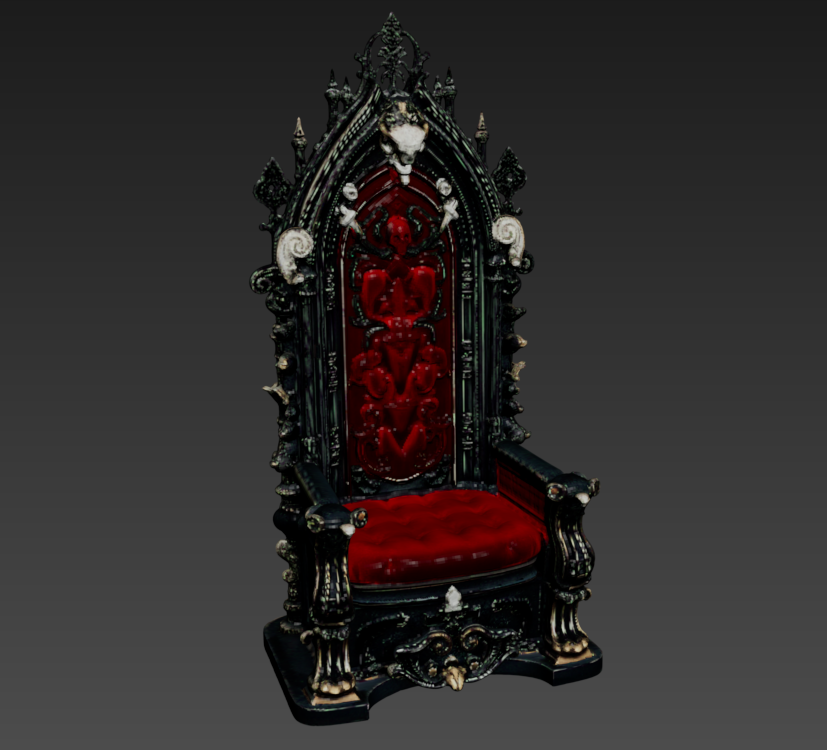
AI-generated Darklord Throne 3D model — made with easy3d
"a dark lord gothic throne with ornate carvings "

Three steps to a 3D model

From idea to download in under 2 minutes. No tutorials, no software to install, no learning curve.

01
✍️
Describe or upload
Type a description in plain English — or switch to Image mode and upload a photo of any real object. No technical jargon required.
02
AI generates your model
Our AI builds a full 3D mesh with realistic textures — PBR maps included. You can adjust polygon count, topology, and art style before finalising.
03
⬇️
Download & use anywhere
Download as GLB, FBX, OBJ, or STL. Open in Blender, import into Unity, upload to IMVU, or send straight to your 3D printer slicer.
New Feature

Got a photo?
Turn it into a 3D print.

Upload any image and our AI builds a full, print-ready 3D model — complete with PBR textures, multiple formats, and adjustable polygon count. No design experience needed. Works from a single photo.

Works from a single photo (JPG, PNG, WEBP)
Download in GLB, FBX, OBJ, and STL
Print on any 3D printer — FDM, resin, or SLS
Adjustable polygon count and quad topology
Try Image to 3D Free →
📷

Drop your photo here

or click to browse

PNG · JPG · WEBP · Max 8 MB
🏺

Built for creators, not engineers

Whether you're building games, designing virtual fashion, or running a 3D printer — easy3d fits your workflow.

🎮
Game Developers
"Your next game asset is one sentence away."
Stop waiting on artists or trawling asset stores. Describe any prop, character element, or environment piece — and it's in your scene in minutes.
  • Low, Medium, High, and Ultra polycount options
  • Quad topology for clean animation rigs
  • Direct Unity & Blender import (GLB / FBX)
  • PBR textures — base color, normal, metallic, roughness
👗
IMVU Creators
"Stop hunting for meshes. Describe what you want."
Design custom furniture, accessories, and wearables without learning 3D modeling. Describe your item and download an IMVU-ready mesh in minutes.
  • FBX export — ready for 3ds Max & IMVU Studio
  • Quad topology for animation-friendly rigs
  • Low-poly preset — optimised for IMVU props
  • Custom texture prompts for precise styling
🖨️
3D Printing
"From idea to print file in under 2 minutes."
No CAD software. No tutorials. Describe or photograph what you want to print and download a print-ready STL that opens straight in your slicer.
  • STL export — works with every slicer
  • Printability check built into every generation
  • Image to 3D — photograph a real object, print a copy
  • Compatible with FDM, resin (SLA/MSLA), and SLS printers
  • <2min
    Average generation time
    6
    Export formats — GLB, FBX, OBJ, STL, USDZ & more
    2
    Generation modes — text & image to 3D
    $0
    To get started — free tier, no credit card

    Simple, honest pricing

    No credit math. No confusing units. Just models per month — you always know exactly what you're getting.

    Starter
    $19
    per month
    Perfect for hobbyists and beginners exploring what AI 3D creation can do.
    • 20 models per month
    • 2 generations per day
    • Text to 3D + Image to 3D
    • GLB, FBX, OBJ, STL exports
    • PBR texture maps included
    • Remesh (topology + polycount)
    Get Started
    Studio
    $99
    per month
    For studios, power users, and teams that need high-volume asset generation every month.
    • 200 models per month
    • 10 generations per day
    • Text to 3D + Image to 3D
    • All export formats
    • HD 4K Texture + PBR maps
    • Priority generation queue
    Get Started

    Free tier included — 3 models when you sign up. No credit card required. Cancel any subscription anytime.

    Common questions

    GLB, FBX, OBJ, STL, and USDZ — all standard formats supported by every major tool. GLB works in Blender and Unity. FBX is best for IMVU and 3ds Max. STL opens in any slicer (Bambu Studio, PrusaSlicer, Cura, OrcaSlicer).
    Switch to Image mode in the app, upload a clear photo of any object (JPG, PNG, or WEBP, max 8 MB), and our AI builds a full 3D mesh with textures. For best results: use a plain background, good even lighting, and keep the object centred and fully in frame.
    Not at all. You describe your model in plain English (or upload a photo) and download the result. If you want to refine it, you can optionally adjust polygon count and topology inside the app — but everything works without any 3D knowledge.
    Any printer. FDM (filament), resin (MSLA/SLA), and SLS all work. Download the STL file and open it in your slicer as normal. Every generation includes an automatic printability check.
    Remeshing lets you change the polygon count (Low / Medium / High / Ultra) and topology (Triangle or Quad) of a generated model before downloading. Quad topology is best for animation and IMVU. Remeshing is included free with every generation — it does not cost additional credits.
    Your generation continues in the background. When you reopen the app, it automatically picks up where you left off — model, remesh, or texture step — and resumes polling. Your history is always saved.
    The main differences: easy3d uses plain model counts (20/80/200 per month) — no confusing credit math. We also explicitly support IMVU creators with FBX export and quad topology. And now with Image to 3D, you can photograph a real object and generate a 3D model from it — great for 3D printing replacements or custom assets.

    Ready to create
    your first 3D model?

    Start free — 3 generations included. No credit card required.